

Check the connection information
Before changing endpoint settings, confirm:- The host or base URL matches the format in the integration-specific guide.
- The provider environment is reachable over HTTPS.
- The API key, password, token, or client secret is current.
- The account has permission for the requested operation and data.
- The provider has enabled the required API.
- Any provider IP allowlist includes the address shown in Poli.
- The organization and connected integration are the intended test targets.
Understand hosted endpoint results
On the hosted Testing step:- A successful result means the safe setup check received an acceptable response.
- A failed testable result is switched off in the setup screen. Correct the issue, then select Retry Test.
- Untested Endpoint means the operation needs real IDs, personal verification values, or a request that would create or change data. It is not proof of a credential problem.
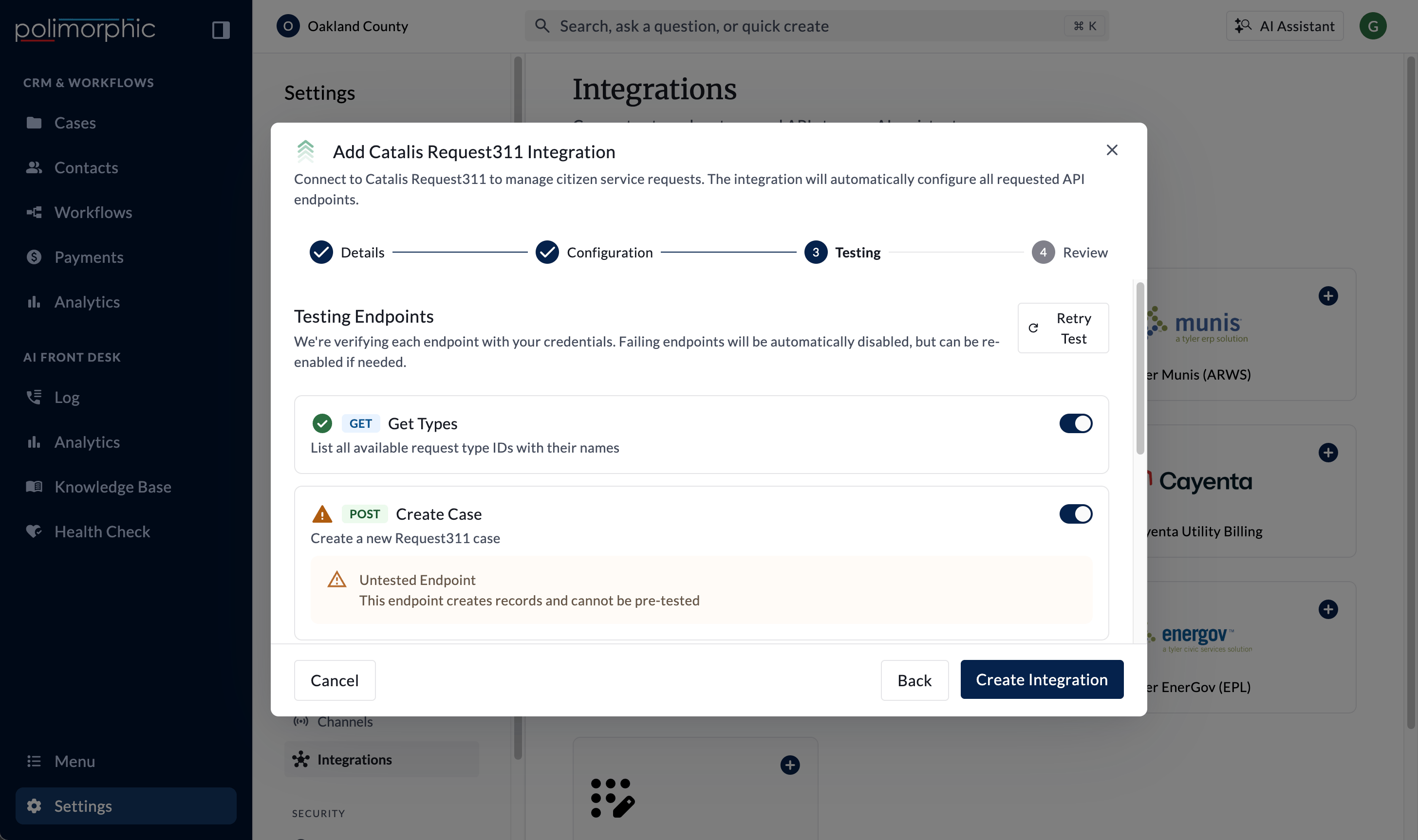
- Catalis Request311 starts with request types.
- FastTrack starts with a built-in permit search.
- Tyler Munis (ARWS) tests bank codes.
- Cityworks tests sign-in.
- SharePoint tests Microsoft token acquisition and, in shared mode, search.
- Cayenta tests location search.
- OpenGov EAM tests listing work orders.
- Tyler EnerGov (EPL) tests sign-in and quick search.
Test a custom endpoint
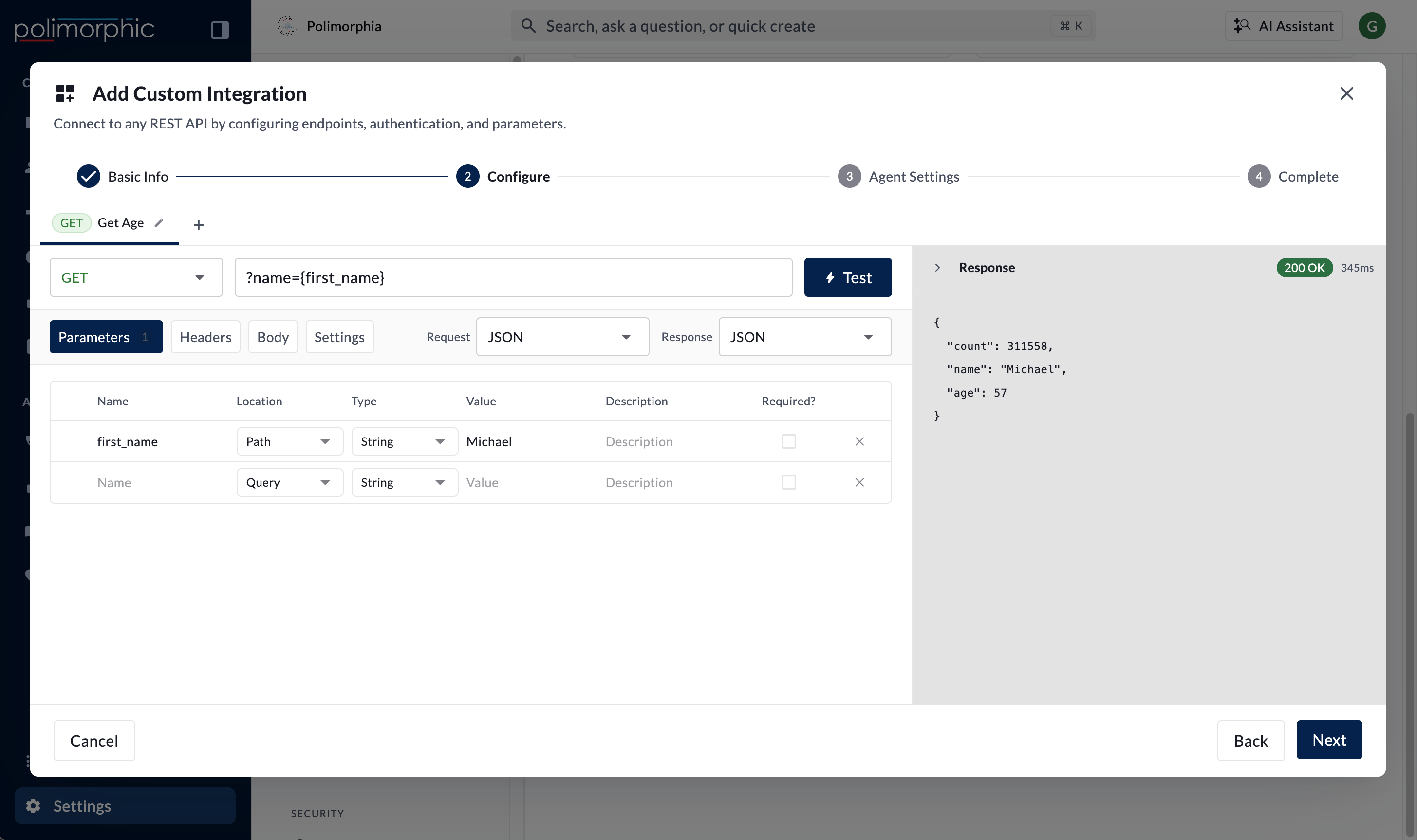
In the custom integration editor:- Select the endpoint.
- Enter synthetic or sandbox values for required parameters.
- Select Test.
- Review the HTTP status, response, elapsed time, and error.
- Correct the configuration and test again before saving.
Fix common problems
URL and host
- Use a complete
https://base URL for a custom API. - Use the exact hosted format in the product-specific guide.
- Remove accidental paths, duplicated schemes, spaces, or trailing text.
- Confirm every
{path_parameter}has a Path parameter value. - Check DNS and network reachability.
Authentication
- HTTP 401: Recheck the API key, username and password, bearer token, query credential, or OAuth client values. To replace an expired secret on a custom integration, open it in the editor, enter the new value, test the endpoint, and save.
- HTTP 403: Confirm the account can access the resource or operation.
- OAuth 2.0: Confirm the grant type, token URL, client ID, client secret, username and password when required, and scopes.
- Delegated SharePoint: Each user must connect Microsoft before the Assistant can search as that user.
- Rotate and replace expired or revoked credentials.
Parameters and request body
- Match parameter names and capitalization to the provider documentation.
- Put values in the correct Query, Path, Header, or Body location.
- Confirm required values are present.
- For JSON, verify nesting and data types.
- For XML or SOAP, verify the envelope, namespaces, element names, and content type.
- For form-encoded requests, verify the provider expects form data instead of JSON.
Response format and mapping
- Confirm the selected response format matches the provider response.
- Verify each response-mapping path exists in a successful sample.
- Test empty lists, missing optional values, and provider error bodies.
- Confirm identity-verification response paths are present when protected data is returned.
Timeout and rate limits
- Increase the endpoint timeout only after confirming the provider is responding slowly.
- Keep the timeout between 1 and 300 seconds.
- Check provider throttling or rate-limit responses.
- Avoid repeated retries that may worsen throttling.
Permissions and allowlists
- Confirm the provider account can perform each enabled capability.
- Ask the provider to verify its IP allowlist and firewall logs.
- Use the fixed outbound address displayed in Polimorphic when IP proxying is enabled.
- Check whether the provider restricts access by environment, tenant, site, department, or record type.
Test each enabled Polimorphic surface
For Chat, Voice, Search, Assistant, and Workflows:- Use a safe question or test record.
- Confirm the correct capability is selected.
- Confirm required identity information is requested before protected data is returned.
- Confirm write operations require the intended confirmation or workflow conditions.
- Confirm disabled capabilities are not offered.
- Review the provider result for correctness, not only a successful status.
Get help from support
Include:- Organization and environment
- Integration name and capability
- Polimorphic surface
- Time of the test and time zone
- HTTP status and sanitized error message
- Whether the issue affects all users or one user
- Whether the same credentials work directly with the provider
- Steps already attempted